Are you looking for a free keyword research tool? Let me be honest with you.
When I started my first blog, I made the same mistake that almost every beginner makes. I wrote what I wanted to write. I did not check what people were actually searching for on Google.
I spent three weeks writing a beautiful, long article. I was so proud of it. I published it, shared it on WhatsApp, shared it on Facebook, and then I waited.
One day passed. Nothing.
One week passed. Still nothing.
One month passed. Only 11 visitors, and 7 of them were my own family members.
That day I understood a painful truth: If you do not do keyword research, you are writing in a dark room. No one will ever find you.
Today, I am going to show you how you can do keyword research completely for free in 2026. You do not need to pay $139 per month for Semrush. You do not need to buy Ahrefs. You can start with $0 and still find amazing keywords that can bring you thousands of visitors from the USA, UK, and all over the world.
I have personally used all the tools I am going to share with you. Some of them are great. Some of them are frustrating. I will tell you both the positive and the negative side, so you can decide for yourself.
So, grab a cup of tea, open your laptop, and let’s do this together, step by step.

Table of Contents
What Is Keyword Research? Simple Explanation For Beginners
Keyword research means finding out the exact words and phrases that people type into Google.
For example, you might think people search for “weight loss tips”. But in reality, they search for “how to lose belly fat in 7 days at home”. That long phrase is a keyword.
If you write an article on the second phrase, you have a much better chance to rank on Google. Why? Because it is specific. The person knows exactly what they want, and Google wants to show them the exact answer.
Think of it like this: Keyword research is like fishing. If you go to a lake where there are no fish, you will sit there all day and catch nothing. But if you go to a lake where thousands of fish are already waiting, you just need a good hook. Keyword research tells you where the fish are.
There are three important things you need to check for every keyword:
1. Search Volume: How many people search for this keyword every month? If only 10 people search for it, it is not worth your time. If 5,000 people search for it, it is worth it.
2. Keyword Difficulty (KD): How hard is it to rank on Google for this keyword? If KD is 80%, it means big websites like Forbes and Wikipedia are already ranking there. You cannot beat them as a beginner. If KD is under 30%, you have a real chance.
3. Search Intent: What does the person actually want? Do they want to learn something? Do they want to buy something? Do they want to compare? If your article does not match their intent, Google will never rank you, even if your article is good.
Most beginners only look at volume. That is a big mistake. I made that mistake too. I once targeted a keyword with 12,100 searches per month. I was so excited. But its difficulty was 92%. I never ranked. I wasted two weeks. That is why you must always check all three things together.
Why Is Keyword Research So Important in 2026?
In 2026, Google is smarter than ever before. With AI Overviews, ChatGPT, and voice search, Google does not rank thin, useless content anymore.
Let me tell you what keyword research actually gives you:
First, it saves your time. Instead of writing 50 random articles that nobody reads, you write 10 targeted articles that bring real traffic. That is smart work, not hard work.
Second, it helps you understand your audience. When you see what people are searching for, you understand their problems, their fears, and their desires. You can then write content that truly helps them.
Third, it helps you make money. If you are doing AdSense or affiliate marketing, you need to know which keywords have high CPC. A keyword like “mortgage calculator USA” can pay you $10+ per click, while a keyword like “funny cat videos” might pay you only $0.02. Same traffic, 500x difference in income.
And fourth, and this is very important for new websites, it helps you find low-competition keywords. Big websites ignore small keywords. They think they are too small. But for you, those small keywords are gold. They are easy to rank, and 20 small keywords together can give you more traffic than one big keyword.
I have a friend in Lahore who started a blog on calculators. He did not target big keywords like “calculator”. He targeted small keywords like “time and a half calculator” and “overtime pay calculator Texas”. Within 6 months, his site was getting 40,000 visitors per month from the USA. That is the power of free keyword research.
How To Find Keywords For Free in 2026 – Step By Step Method
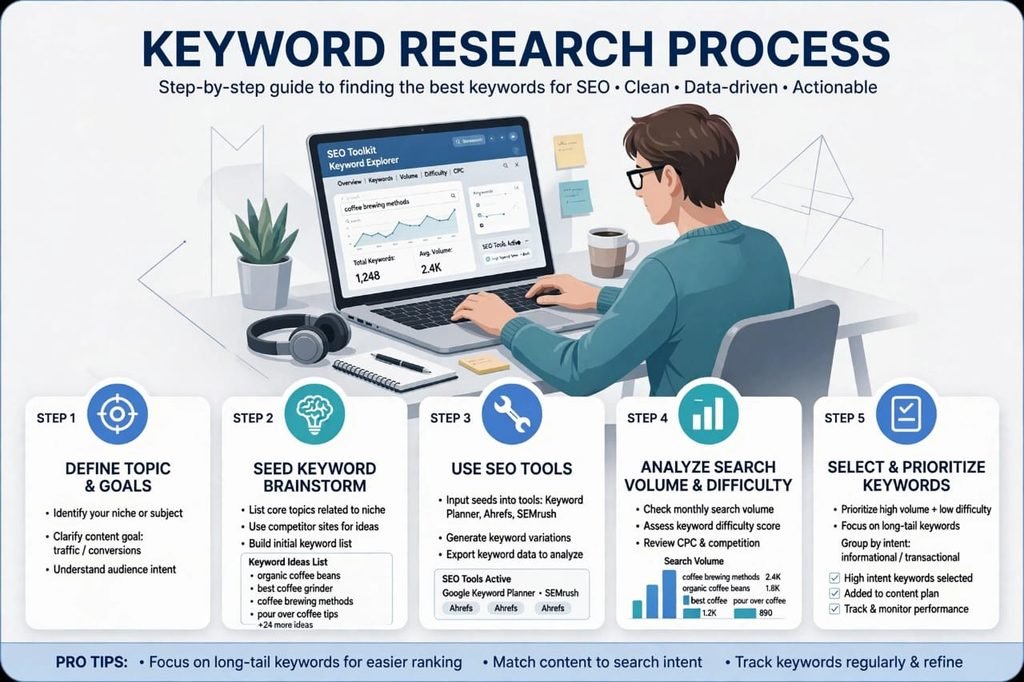
Now let’s come to the practical part. I will show you my exact 5-step method that I use for every new website, including tool.saasmaganews.com.
Step 1: Start With A Seed Keyword
A seed keyword is a broad topic. For example, if your blog is about health, your seed keyword could be “weight loss”. If your blog is about finance, it could be “credit card”.
Do not try to be too smart here. Just write down 5 to 10 basic topics related to your niche on a piece of paper. These are your seeds.
Step 2: Use Google Autocomplete – The Hidden Free Tool
This is my favourite free trick, and 90% of beginners do not know about it.
Open Google.com, type your seed keyword, but do NOT press Enter. Just wait. Google will automatically show you 10 suggestions. These are real things that real people are searching for right now.
For example, if you type “how to create backlinks”, Google will show you:
- how to create backlinks for free
- how to create backlinks for new website
- how to create backlinks in 2026
Copy all of these. They are free, and they are 100% real data from Google itself.
Then, scroll down to the bottom of the Google search page. You will see “People also ask” and “Related searches”. This is another goldmine. Copy those too.
The positive side of this method is that it is 100% free and always accurate. The negative side is that it does not tell you the search volume or difficulty. You have to check that in another tool.
Step 3: Check Volume And Difficulty In A Free Tool
Now take your list of 30-40 keywords from Step 2 and put them into a free keyword research tool. I will share the best 7 tools below. For now, just understand the process.
You want to find keywords that have:
- Volume: 500 to 5,000 per month (perfect for new sites)
- KD: Less than 30%
- Intent: Informational (people want to learn)
If a keyword has 50,000 volume and 85% KD, skip it. It is a trap. Leave it for the big websites.
Step 4: Check The Competition Manually
This is a step that even many experts skip, but it is very important.
Type your keyword in Google and look at the top 10 results. Ask yourself three questions:
- Are the top results big websites like Wikipedia, Forbes, Amazon? If yes, skip it.
- Are the top results small blogs like yours? If yes, you can beat them.
- Is the content old? If the top article is from 2021 and has not been updated, you can write a fresh 2026 version and beat it easily.
I once found a keyword where the top result was a 400-word article from 2019. I wrote a 1,800-word updated article and ranked #2 within 3 weeks. That is how you win.
Step 5: Create Better Content And Publish
Now you have your winning keyword. Do not just write a normal article. Write the BEST article on that topic on the whole internet.
Make it longer, make it clearer, add images, add examples, add FAQs, and add your own personal experience. Google loves helpful, human content in 2026.
Remember, keyword research only brings people to your door. Your content is what makes them stay, read, and come back again.
7 Best Free Keyword Research Tools in 2026 [Tested Personally]
Now let’s talk about the tools. I have tested all of these myself. I will tell you the honest pros and cons of each one, no fake promotion.
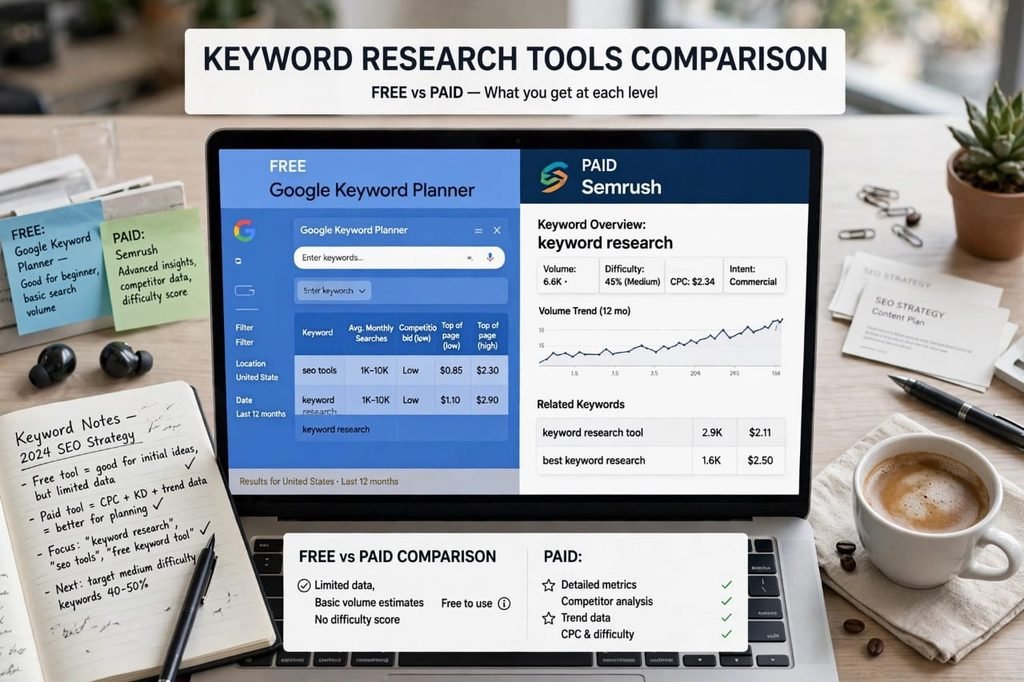
1. Google Keyword Planner – Best For Beginners, 100% Free
This is the official tool from Google itself. It is made for Google Ads, but bloggers use it for free keyword research.
Positive Points: It is completely free. The data comes directly from Google, so it is very accurate. You can see search volume for USA, UK, Pakistan, or any country separately.
Negative Points: It does not show exact volume. It shows a range like “1K – 10K”. It also does not show keyword difficulty. And to use it, you need to create a Google Ads account, which confuses many beginners.
My Verdict: If you are just starting, start here. It is boring to look at, but the data is gold.
2. Google Search Console – Best For Your Own Website
If you already have a website, this is your secret weapon. And it is also 100% free.
Go to Search Console > Performance > Queries. It will show you exactly which keywords your site is already showing up for, even if you are on page 7 or 8.
For example, on my new site, I saw that Google was showing my site for “backlink building” 39 times, even though I had zero clicks. That told me Google thinks my site is about backlinks. So I wrote more articles on backlinks, and my clicks started coming.
Positive: Real data from your own site. No guessing.
Negative: It only works if your site is already indexed. For a brand new site with no articles, it will show zero data.
3. Google Trends – Best For Finding Trending Topics
Google Trends shows you if a keyword is going up or down.
For example, “AI tools” is going up like a rocket in 2026. “CD player” is going down. If you write on a dying topic, you will get less and less traffic every year.
Positive: You can compare two keywords and see which one is more popular. You can also see seasonal trends. For example, “Christmas gift ideas” goes up in December.
Negative: It does not show exact search volume, only a score from 0 to 100. So you cannot rely on it alone.
4. Semrush Free Version – Best For Difficulty Score
Semrush is a paid tool, but it has a free version that gives you 10 searches per day. That is enough for a beginner.
When I searched for “free keyword research tool” in Semrush, it showed me Volume: 6,600 and KD: 31%. That is very useful information.
Positive: It shows volume, difficulty, CPC, and intent all in one place. The interface is beautiful and easy to understand.
Negative: The free version is limited. After 10 searches, it stops you and asks you to pay. The paid plan is $139 per month, which is too expensive for most beginners in Pakistan and India.
My Honest Advice: Use the free 10 searches daily. Create a free account, do your 10 searches in the morning, write down the data in Excel, and come back tomorrow.
5. Ahrefs Free Keyword Generator – Best For Quick Ideas
Ahrefs is the most expensive SEO tool, but its free keyword generator tool is amazing.
You just type one keyword, and it gives you 100 ideas for free. No login needed.
Positive: Super fast. No account needed. Good for quick brainstorming.
Negative: It does not show full data in the free version. It hides the exact difficulty for many keywords.
6. Ubersuggest (Neil Patel) – Best For Content Ideas
Ubersuggest gives you 3 free searches per day. It shows you keyword ideas, content ideas, and even what your competitors are ranking for.
Positive: It also gives you content ideas. It tells you which articles are getting the most shares on Facebook and Pinterest.
Negative: The free limit is very low. After 3 searches, you have to wait till tomorrow. And sometimes its data is not as accurate as Semrush.
7. AnswerThePublic – Best For Question Keywords
This is my secret weapon for FAQ sections. You type a keyword like “keyword research” and it shows you all the questions people ask: “what is keyword research?”, “how to do keyword research for free?”, “why is keyword research important?”
Positive: Perfect for finding long-tail question keywords. These are super easy to rank for.
Negative: Free version only allows 3 searches per day. And its design is a little confusing for beginners.
Free vs Paid Keyword Research Tools – Which One Should You Choose?
This is the question I get asked the most: “Shahid Bhai, should I buy a paid tool?”
Let me give you my honest, personal opinion.
If you are a beginner and you have not earned even $100 from your blog yet, DO NOT buy a paid tool. Please. I have seen many beginners spend $139 on Semrush and then quit blogging after one month because they did not earn anything. That is a waste of money.
Free tools are more than enough for the first 6 months. I built my first site to 10,000 visitors per month using only Google Keyword Planner, Search Console, and Google Autocomplete. I did not spend a single rupee.
Paid tools become useful when you are already earning and you want to scale faster. When you have 100 articles and you want to find 100 more keywords quickly, then a paid tool saves you time. Time is money at that stage.
But in the beginning, your time is free, your hard work is free, and free tools are free. Use that combination.
The negative side of free tools is that they are slow. You have to check 3-4 tools to get full data. The positive side of paid tools is that they give you everything in one dashboard. That is the only real difference. The data itself is almost the same.
So, start free, earn first, then invest.
5 Common Mistakes Beginners Make In Keyword Research
Please read this part carefully. These 5 mistakes can destroy your blog, even if you work very hard.
Mistake #1: Targeting Only High Volume Keywords
New bloggers love big numbers. They see 100,000 volume and they get excited. But those keywords are controlled by big companies. You will never rank. Always target low competition first.
Mistake #2: Ignoring Search Intent
If a person searches for “buy iPhone 15”, they want to buy. If you write an article “What is iPhone 15?”, Google will not rank you. You must match what the person wants.
Mistake #3: Using Only Short Keywords
Short keywords like “SEO” or “money” are impossible to rank for. Use long-tail keywords like “how to do SEO for a new blog in 2026”. They have less traffic, but they convert 10x better.
Mistake #4: Not Checking Competitors
Never target a keyword without checking who is already ranking. If the top 10 are all big websites with 5,000-word articles, move on and find an easier keyword.
Mistake #5: Keyword Stuffing
In 2026, if you write your keyword 50 times in one article, Google will penalize you. Write naturally, like a human. Use your keyword in the title, in the first paragraph, in one heading, and 3-4 times in the body. That is enough.
I made all 5 of these mistakes in my first year. Please do not repeat them.
My Personal Keyword Research Checklist For USA Traffic
If you want traffic from the USA, you need to follow this checklist every time:
- Set location to United States in your tool. Do not use global data.
- Look for keywords with volume 1,000 to 10,000.
- KD must be under 30%.
- CPC should be above $1.00. This means advertisers are paying for it, so AdSense income will be good.
- The keyword must be in English, and it must be something an American person would actually type.
- Check if there is a “People also ask” box for this keyword. If yes, it means Google likes this topic.
I use this exact checklist for tool.saasmaganews.com, and it is working. My USA traffic is slowly growing every week.
Frequently Asked Questions (FAQs)
What is the best 100% free keyword research tool?
Google Keyword Planner is the best 100% free tool because its data comes directly from Google. For difficulty score, use Semrush free version (10 searches per day) together with it. The combination of both is perfect for beginners.
Can I do keyword research without any tool?
Yes, you can. Use Google Autocomplete, People Also Ask, and Related Searches. These are all free and they show you real search data. You will not get volume and difficulty, but you will get real ideas. Many successful bloggers started this way.
How many keywords should I target in one article?
Target one main keyword and 4-5 related secondary keywords. For example, if your main keyword is “free keyword research tool”, your secondary keywords can be “keyword research free”, “how to find keywords for free”, and “best free SEO tools”. Do not target 20 keywords in one article. Google will get confused.
How long does it take to rank for a free keyword?
For a new website, it usually takes 2 to 4 months to rank for a low-competition keyword. For a slightly older website, it can take 3 to 6 weeks. Please be patient. SEO is not a lottery. It is like farming. You sow today, you harvest after a few months.
Is Semrush free version enough for beginners?
Yes, for the first 6 months, it is more than enough. You get 10 searches per day. If you do 10 searches daily for 30 days, that is 300 keywords researched in one month, completely free. That is a lot of data.
Final Conclusion – My Honest Advice To You
Look, I will be very honest with you.
Keyword research is not magic. It will not make you rich overnight. There is no tool in the world that will do the work for you.
But if you do it correctly, it will change your blogging journey completely. It will take you from writing random articles that nobody reads, to writing targeted articles that Google loves and people actually need.
Start today. Do not wait for the perfect paid tool. Open Google Keyword Planner, open Semrush free version, and find your first 10 low-competition keywords today. Write down one keyword, write one good article on it, and publish it.
Then repeat. One keyword. One article. Every day.
After 30 articles, you will start seeing traffic. After 100 articles, you will start seeing income. I promise you, this method works. It worked for me, it worked for my friends, and it will work for you too.
If you found this guide helpful, please share it with one friend who is also struggling with blogging. You might change their life.
And if you want me to do keyword research for your niche for free, just leave a comment below with your niche, and I will reply with 5 easy keywords for you.
Good luck, and happy blogging!