If you are searching for how to build internal links to my website, you are already thinking like a pro SEO. Most beginners only focus on backlinks from other websites, but smart SEOs know that internal linking is the free and most powerful weapon you have in your hands.
In this complete guide, I will share my personal experience with internal linking, what worked for me, what mistakes I made, and how you can build a perfect internal linking structure that Google loves.
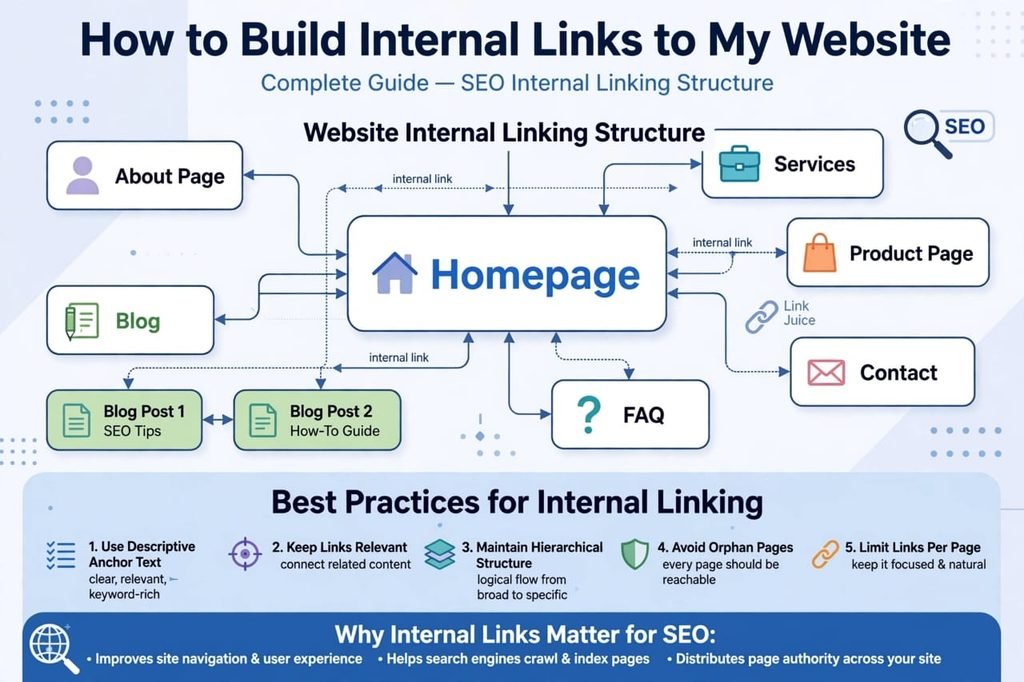
Table of Contents
What is Internal Linking? Simple Explanation
Internal linking means linking one page of your website to another page of the same website. For example, if you have a tool page like Website Value Calculator and you link it from your blog post, that is an internal link.
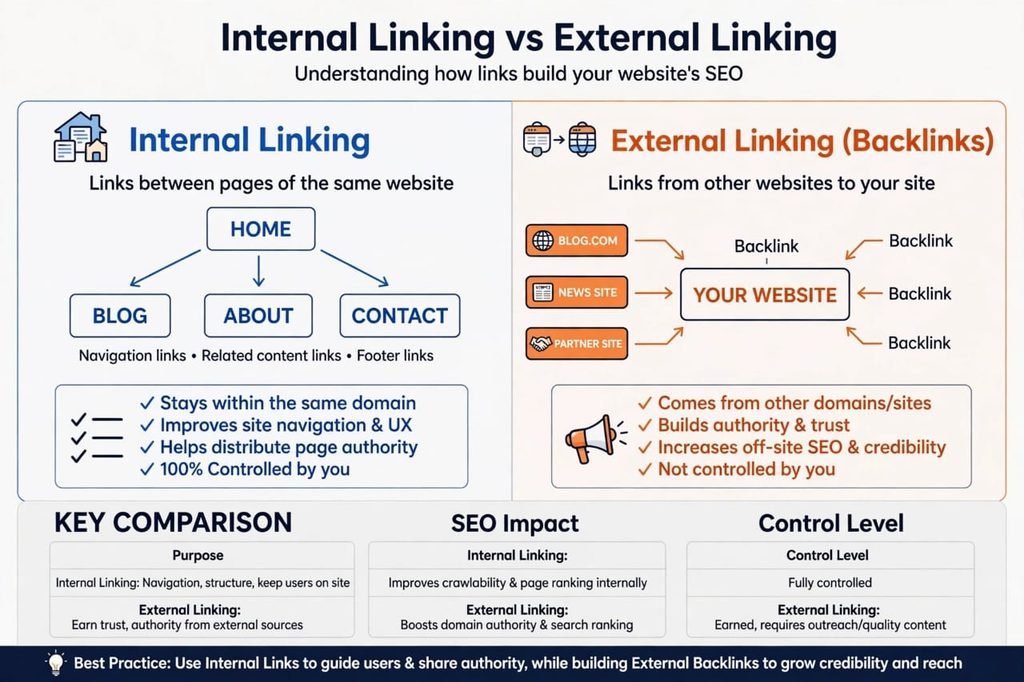
It is completely different from external linking. External link is when another website links to you (backlink). Internal link is 100% in your control. You don’t need to request anyone, you don’t need to pay.
Think of your website like a city. Your homepage is the main center, and internal links are the roads that connect every house, shop, and building. Without roads, Google and users will get lost.
Why Internal Links Are So Important? My Experience
When I started my first website, I made a big mistake. I created 30+ pages but never linked them together. The result? My pages were “orphan pages”. Google Search Console was showing them as “Discovered – currently not indexed”. I was frustrated.
Then I learned about internal linking and everything changed. Here is what internal links actually do:
- 1. Helps Google Crawl Faster: Google bots follow links. If you link your new page from your homepage, Google finds it within hours.
- 2. Distributes Link Juice: Your homepage has the most authority. When you link from homepage to a new tool page, you pass some of that authority.
- 3. Improves User Experience: A user reading about “what is link building” will love it if you also link to your “how to check domain authority” tool.
- 4. Reduces Bounce Rate: Internal links keep users on your website for a longer time. This is a positive ranking signal for Google.
- 5. Increases Website Value: Yes, a well-linked website has a higher value in tools like Website Value Calculator because it has better structure.
How to Build Internal Links to My Website? 7 Proven Methods
1. The Topic Cluster Method (Most Effective in 2026)
This is my favorite method and it worked wonders for my site tool.saasmaganews.com. Create one main Pillar Page, for example “Link Building Guide”. Then create 5-7 small cluster pages like “how to build internal links”, “how to build backlinks for new website”, “free backlink checker tools”. Now link all cluster pages to the pillar page and vice versa. Google loves this structure.
2. Use Relevant Anchor Text – Don’t Spam
Anchor text is the clickable text. Never use “click here” or “read more”. Always use relevant keywords. For example, instead of “Click here to check DA”, write “Check your Domain Authority for free using our tool”. But be careful – don’t use exact same anchor text 100 times, it looks spammy. Mix it up naturally.
3. Link From High Authority Pages
Go to your Google Search Console > Pages > Most impressions. Find your top 3 pages that get most impressions. Add internal links from those pages to your new pages. This is the fastest way to get your new page indexed. I use this trick every week.
4. Add Related Posts Section at The End
This is the easiest method. At the end of every blog post, add a section “Related Tools” or “You May Also Like”. Link 3-4 relevant tools or articles there. Users love it and it automatically creates internal links.
5. Use Navigation and Footer Smartly
Your main menu and footer are present on every page. So any link you add there gets a link from every page of your website. Add your most important tool pages in the main menu. But don’t add 20 links in menu, keep it clean – max 7 links.
6. Contextual Linking Inside Content
This is the most natural way. While writing an article, when you mention a topic that you have already covered, link to it. For example, in this article I can write: “If you want to know your website worth, use our Website Value Calculator”. This is natural and powerful.
7. Fix Orphan Pages Regularly
An orphan page is a page with no internal links pointing to it. It is invisible to Google. To find them, use Screaming Frog (free for 500 URLs) or just go to Search Console > Pages > Not Indexed. If a page has no internal links, link it from at least 2-3 relevant pages immediately.
The Positive and Negative Sides of Internal Linking
Let’s be honest, internal linking is not all positive. There are negatives if you do it wrong.
Positive Points (Pros):
- 100% Free and Fully in Your Control
- Instant Results – You see indexing within 24 hours
- No Risk of Google Penalty Unlike Buying Backlinks
- Improves User Experience and Time on Site
- Helps You Rank for Long-Tail Keywords Like “how to build internal links to my website”
Negative Points (Cons) – Mistakes to Avoid:
- Over-Optimization: If you add 100 internal links on one page with exact match keywords, Google will consider it spam. I made this mistake and my ranking dropped for 2 weeks.
- Broken Internal Links: If you delete a page but don’t remove its internal links, you create 404 errors. This hurts SEO badly.
- Linking to Irrelevant Pages: Don’t link a “paycheck calculator” page to a “backlink checker” page just for the sake of linking. It confuses users.
- Using NoFollow for Internal Links: Never add nofollow to your internal links unless it’s a login or admin page. You want to pass link juice.
How Many Internal Links Should You Add?
This is the most asked question. According to my testing, for a 1000-word article, 5-8 internal links are perfect. For a 1600+ word article like this one, you can add 10-12 links. For a tool page, 15-20 internal links (including menu/footer) are fine. The golden rule: If a link helps the user, add it. If it’s just for SEO, don’t.
My Personal Checklist Before Publishing Any Page (2026)
Before I hit publish, I always check this:
- Did I link to at least 3 old relevant pages?
- Did I link FROM at least 2 old pages TO this new page?
- Is my anchor text natural and diverse?
- Did I add this page to my related posts section?
- Did I check for any broken links using Rank Math’s Link Monitor?
Why Most New Websites Fail Without Proper Internal Linking
Many beginners focus only on backlinks, but they ignore the power of their own website structure. If your website has 50 pages and none of them are connected, Google will treat most of them as orphan pages. This is the biggest reason why new websites do not get indexed fast.
A good internal linking strategy helps you distribute link equity. When you get one strong backlink to your homepage, you can pass that power to all your inner pages through internal links. This method is called link juice distribution.
Pro Tip for Beginners
Do not add 20 links in one article. Add only 3 to 5 relevant links. For example, if you write about SEO, link to your SEO tools or SEO guides only. Irrelevant linking confuses both users and Google. Always use natural anchor text and make sure every important page is reachable within 2 clicks from your homepage. This simple habit will improve your crawl budget and ranking.
Final Words: Start Today
So now you know exactly how to build internal links to my website. You don’t need any paid tool. Just open your top 5 articles today and add 2-3 relevant internal links to your new pages. You will see your average position in Google Search Console improve from 50+ to under 20 within 15 days.
Remember, external backlinks build your website’s authority, but internal links build your website’s foundation. Without a strong foundation, authority means nothing.
Start with the Topic Cluster method and fix your orphan pages first. Good luck!
FAQs
What is the best way to build internal links to my website?
The best way is the topic cluster method. Create a pillar page and link all related small pages to it using relevant anchor text. Also link from your high-traffic pages to new pages.
How many internal links are good for SEO?
For a 1000-word post, 5-8 internal links are ideal. For 1600+ words, 10-12 links. Don’t exceed 100 links per page including menu and footer, as per Google guidelines.
Do internal links help with backlink building?
Yes, indirectly. When you have strong internal linking, the link juice from your backlinks gets distributed to all your pages, so your whole website benefits from one good backlink, not just one page.
What is the difference between internal linking and external linking?
Internal linking is linking between pages of the same domain (your own website). External linking is getting links from other websites to your site (backlinks). Both are important but internal is fully in your control.